Is face recognition private? On-device vs cloud face grouping
Face grouping is useful and sensitive. What happens when it runs on your own PC instead of a server, what is stored, and how to remove a person's name again.
On this page
Is face recognition private? That depends on where it runs and what it keeps. In firelet.media Gallery it runs entirely on your own computer: the face models are downloaded once, your photos are analysed by your PC's processor, and the results and names stay in the library database on that PC. No photo, face or name is uploaded, and nothing happens until you ask.
Face grouping is one of the most useful things a photo library can do, and one of the most personal. This post sets out plainly what firelet.media Gallery stores, where the models come from, and how to name, rename and forget people.
What face grouping actually stores
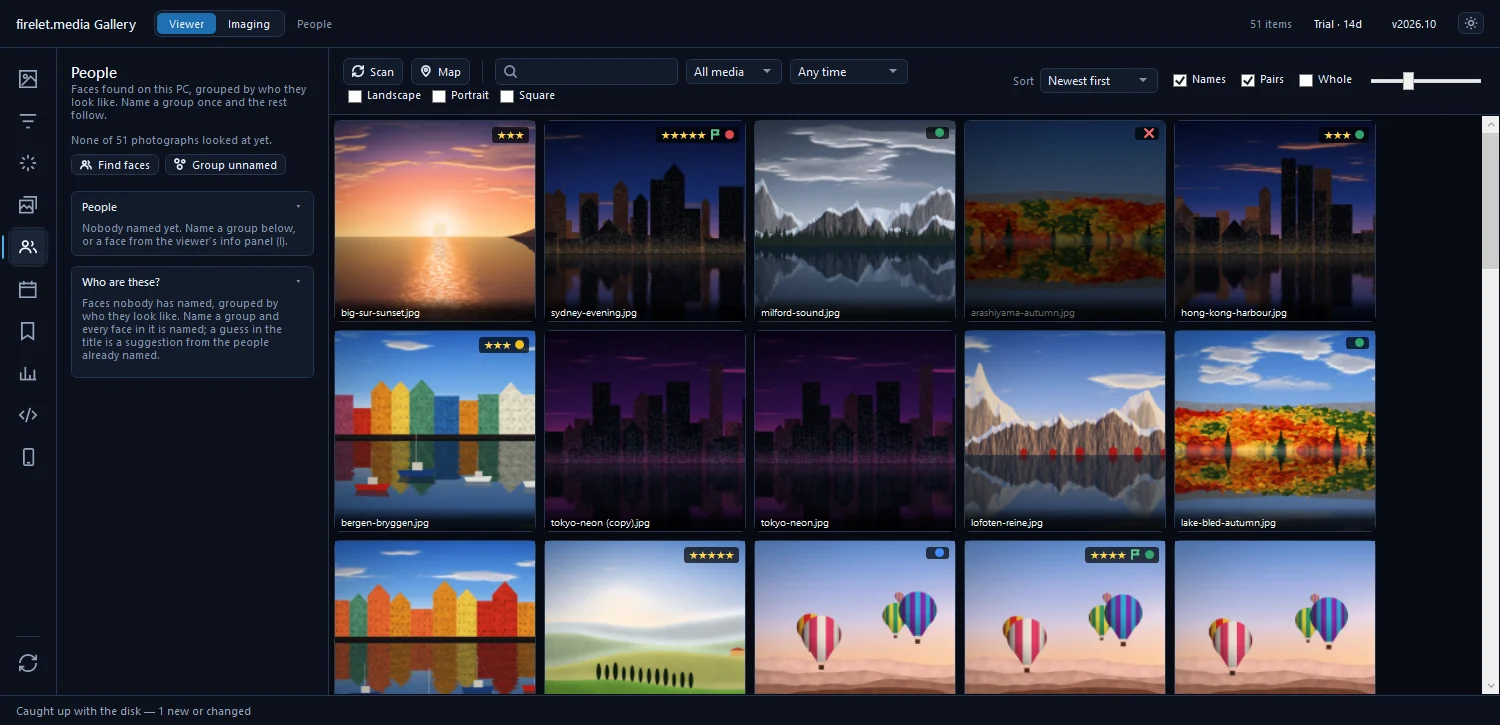
When you press Find faces in the People panel, the gallery looks at each photograph and records, for every face it finds:
- Where the face is in the photo: a box, stored as proportions of the picture.
- How confident the detector was, and how sharp the face is.
- A short numerical description: 128 numbers that let two faces be compared. Similar faces have similar numbers. The description is a list of numbers, not a picture of the face.
- Who it is, if you've named it, and whether that name was confirmed by you.
For each person, the gallery stores a name. That's it. There's no separate collection of face images: the little face thumbnails in the People panel are cut from your photos when they're shown.
All of this lives in the library database, gallery.db, in %LOCALAPPDATA%\PictureGallery\ on your PC, alongside your stars, albums and keywords. Like everything in that folder, it's included when you back the file up, and it goes nowhere else.
Is face recognition private? On your PC vs on a server
Face grouping can run in two places, and both are legitimate designs with different trade-offs.
When a photo service groups faces on its servers, your photos (or information derived from them) are processed there, under that service's own policies. In return, the grouping is available on every device you sign in to, and your own computer does none of the work.
When grouping runs on your PC, as it does in firelet.media Gallery, the photos never leave the machine to be analysed, and the face data stays in a file you control. The costs are on your side: your PC does the work, the results are on that PC only, and backing them up is up to you.
| On a server | On your PC (firelet.media Gallery) | |
|---|---|---|
| Where photos are analysed | The service's servers | Your computer's processor |
| Where face data is kept | With the service | In gallery.db on your PC |
| Available on other devices | Usually | No, only on that PC |
| Who backs it up | The service | You |
Which models and where they come from
firelet.media Gallery doesn't include face models out of the box. They arrive only when you press Download face models in the People panel (Alt+5):
- YuNet (MIT licence) finds faces in a photo.
- SFace (Apache-2.0 licence) turns each face into the 128-number description used to compare them.
Together they're about 39 MB, fetched once from Hugging Face and checked against pinned digests, so a file that has been altered is refused. After that, Find faces runs on your computer's processor. Its tooltip says it plainly: "Runs on this PC; nothing leaves it." It looks at photos only, not videos.
If you'd rather have no face data at all, simply don't download the models or press Find faces. The rest of the gallery, including AI search, works without them. The macOS and Linux builds, being finished, use the same models on the processor. The free Android companion, coming soon, has no face grouping at all.
Naming and forgetting people
You stay in charge of every name. After Find faces and Group unnamed, the Who are these? list shows groups of faces that look like one person. For each group you can:
- Press Name… to give it a name.
- Press Yes to accept a suggestion, shown as a question such as "12 faces — Anna?".
- Press Show to see the pictures first.
- Press Skip to leave it unnamed for now.
A suggestion never becomes a name until you accept it, and only faces you've confirmed teach the gallery who someone is. You don't have to name anyone: unnamed groups are useful on their own for Show.
To change your mind later, right-click a person in the People list:
- Rename… changes the name everywhere. Renaming someone to a name that already exists merges the two.
- Forget this person removes the name. The confirmation spells out what happens: their pictures stay, and the faces in them become unnamed.
The full naming workflow is in how to find and name people, and how to find every photo of one person puts it to work.
Sharing photos without names
Names stay out of shared photos unless you put them there.
- Exported copies carry no names. Export never embeds the gallery's own information, including people's names, stars, keywords and captions, into the copies it writes. See how to export photos.
- Metadata already inside a JPEG travels only when Keep camera data, dates and keywords (JPEG from JPEG) is ticked in the Export window. Untick it to share the picture and nothing else.
- XMP sidecars are written only when you ask, with Write changed pictures, Write the selection or Write metadata to XMP. They include people's names, so they're useful for other photo programs, and worth leaving out when you share a folder with someone.
The same principle runs through the whole gallery: your photos never leave your computer. It contacts firelet.media for licence and update checks, downloads AI models when you press the button, and uses a map or place-name service only if you set one up. It sends no telemetry or crash reports. What data is sent lists every connection, how AI photo search works on your own computer explains the other on-device model, and private photo storage on your PC covers the rest.
Questions people ask
Where is face data stored?
In the library database (gallery.db) on your PC. Names are written anywhere else only if you choose to write XMP sidecars.
Can I remove a person?
Yes. Right-click them in the People panel and choose Forget this person. Their pictures stay; the faces in them become unnamed.
Was this post helpful?
Thank you — that is counted, and nothing else about you is. Still stuck? Ask a person.