A Google Photos alternative for Windows that works offline
Keep the parts of Google Photos you rely on — search by description, faces, memories, phone backup — without uploading anything. How each one works on your own Windows PC.
On this page
Most people who leave Google Photos don't miss the storage. They miss four things: typing what they're looking for and finding it, faces grouped automatically, "memories" from years ago, and the phone backing itself up. All four can work on your own Windows PC with nothing uploaded — here is how each one works in firelet.media Gallery, and what to do with the photos you already have in Google's cloud.
1. Search by description, on your PC
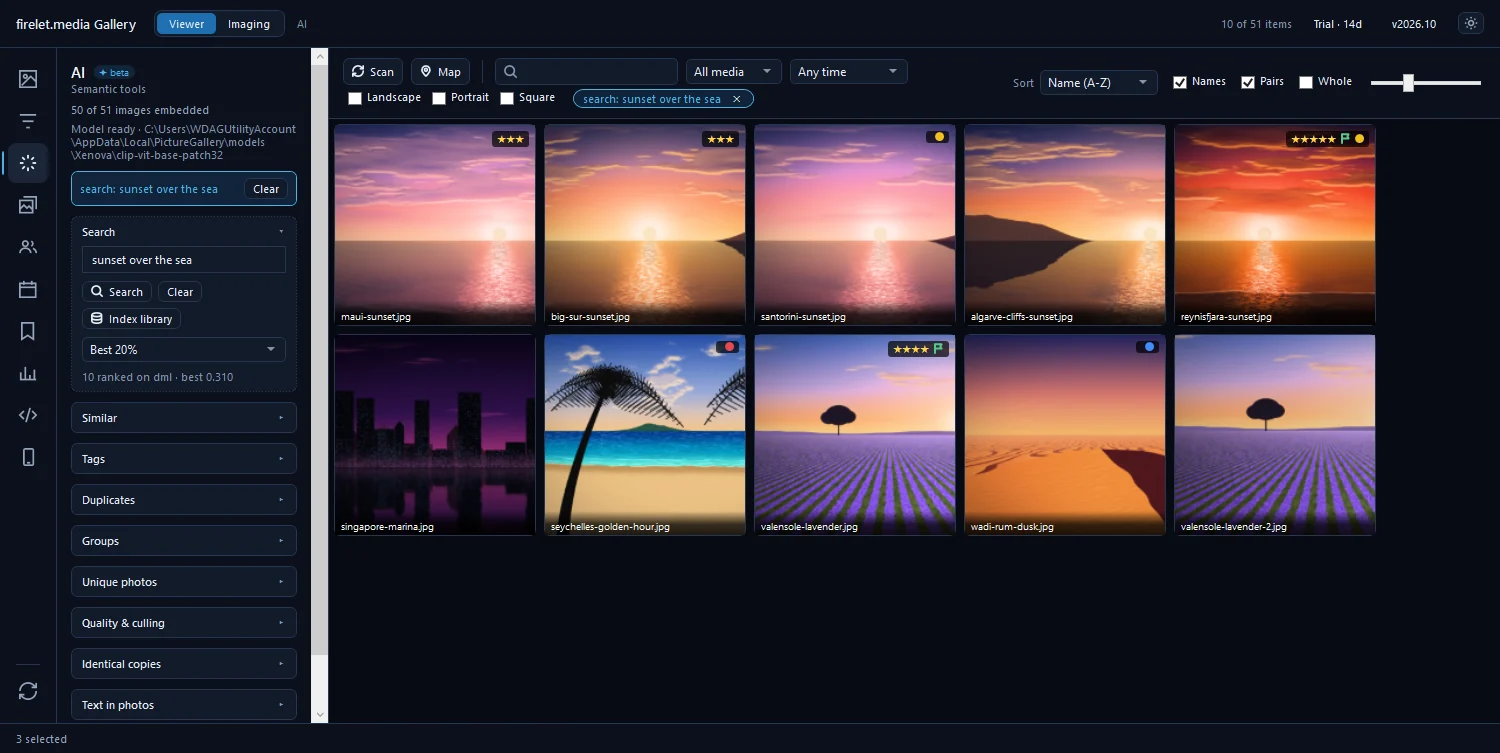
Google Photos' best trick is search: type "beach" or "birthday" and the photos appear. firelet.media Gallery does the same with an AI model that runs on your own computer. Open the AI panel (Alt+3), download the model once, press Index library, and then type what you remember — "dog on the beach", "receipt", "boats at sunset". The whole library is ranked in milliseconds, and it keeps working without internet.
It also reads text inside photos — signs, slides, screenshots — so "wifi password" finds the photo of the router label. How offline AI search works.
2. Faces, grouped without a server
Open People (Alt+5), download the face models once, and press Find faces. Faces are grouped by who they look like; name a group once and every photo of that person is one click away. The faces and names are stored in your library on the PC, and never sent anywhere. Find every photo of one person.
3. Memories: On this day and events
The Calendar panel shows your library by year, month and day, splits trips into events by the gaps between shots, and has On this day — the photos you took on this date in earlier years.
4. Phone photos, home over Wi-Fi
The free Android companion pairs with the PC by scanning a QR code, then copies photos over your own Wi-Fi when the phone is home. No cable, no cloud, and nothing leaves your network. Back up phone photos to your PC without the cloud.
Getting your photos out of Google Photos
- Export with Google Takeout. Choose Google Photos and download the zip files.
- Unpack everything into one folder on a drive with room to spare.
- Add that folder to the gallery. Nothing is moved or copied.
- Fix dates in bulk where files came out with the wrong ones — photos in the wrong order.
- Clear duplicates: exports and old backups often contain the same photo twice. The gallery's Identical copies and Duplicates tools only flag extras; nothing is deleted unless you choose it.
The full walk-through is in leaving a cloud photo service.
A home server, or a desktop app?
There are two good ways to keep Google-Photos-style features at home, and they suit different people:
- A self-hosted server such as Immich or PhotoPrism gives you a web app and phone backup from anywhere — in exchange for running, updating and backing up a server.
- A desktop app such as firelet.media Gallery has nothing to host: install it on the PC where your photos already are, and it works.
If you're comfortable running a server, try Immich. If you'd rather it just worked on Windows, try firelet.media Gallery free for 14 days — every feature, no limits, and nothing uploaded. It's $160 once, with no subscription.
Questions people ask
Can I search my photos by description without uploading them?
Yes. firelet.media Gallery runs its AI search model on your PC. The model is downloaded once; after that, searching for 'dog on the beach' works offline and nothing about your photos leaves the computer.
How do I get my photos out of Google Photos?
Use Google Takeout to download your library. It arrives as zip files of folders, often with separate JSON files holding dates and descriptions. Unpack it into a folder, then fix dates and duplicates before organising — see our guide to leaving a cloud photo service.
Can my Android phone back up to my PC without the cloud?
Yes. The free firelet.media Gallery companion app pairs with the PC by QR code and copies photos over your own Wi-Fi. Nothing goes through a server.
What about a self-hosted server like Immich?
Immich and PhotoPrism are excellent if you want to run and maintain a home server. firelet.media Gallery is for people who want the same kind of search as a desktop program, with nothing to host.
Was this post helpful?
Thank you — that is counted, and nothing else about you is. Still stuck? Ask a person.