Pay once, own it: how firelet.media Gallery is priced
One payment per computer and the program is yours for good. Updates are optional at $100 a year, whenever you want them. Here is how the one-key model works.
On this page
firelet.media Gallery costs $160 once per computer, with no subscription. That payment buys the program for good: every feature, the build you bought and every earlier one, and a key you can move to a new PC whenever you like. Updates are optional at $100 a year per computer, bought at the checkout or at any time later.
If you have been looking for a one-time purchase photo manager, this post explains exactly what the money buys, how updates work, how one key covers several computers, and what happens if you never pay again.
The short version
| Question | Answer |
|---|---|
| What does it cost? | $160 once, per computer |
| What is included? | Every feature, plus the build you buy and every earlier one |
| What about updates? | Optional: $100 for a year, per computer, now or later |
| Several computers? | One key; choose how many at the checkout, $160 each |
| Can I try it first? | Yes: 14 days, every feature, no card and no account |
| Can I change my mind? | Yes: a full refund within 14 days of buying |
Windows is on sale now. The macOS and Linux builds are being finished, and there is no date for them yet.
What $160 buys in a one-time purchase photo manager
There are no tiers and no add-ons. The AI search, face grouping, map, editor, import, scanner and the Wi-Fi phone link are all part of the one program.
- The program, for good. The build you buy, and every build released before it, is yours to keep and reinstall. Your account's Downloads page always has them.
- One computer at a time per seat. Moving to a new PC is free and unlimited, so an upgrade or a repair never costs you a second purchase.
- It works offline. The licence checks in with firelet.media about once a month, and keeps working for three months without internet. You need a connection once, to activate.
- An account to hold your key. Buying sets one up automatically and emails you a temporary password. The key arrives by email and always sits under Licences in your account. Nothing about your library is uploaded, then or ever.
What $160 does not include is months of updates. That is a separate, optional purchase, explained in the next section.
Payments go through Paddle, the merchant of record. The checkout adds any sales tax, VAT or GST that applies where you live, Paddle's name appears on your card statement, and receipts and tax invoices come from Paddle. Your account's Orders page links to them.
Once you have the key, activating takes a minute:
- Open firelet.media Gallery on the computer you want to license.
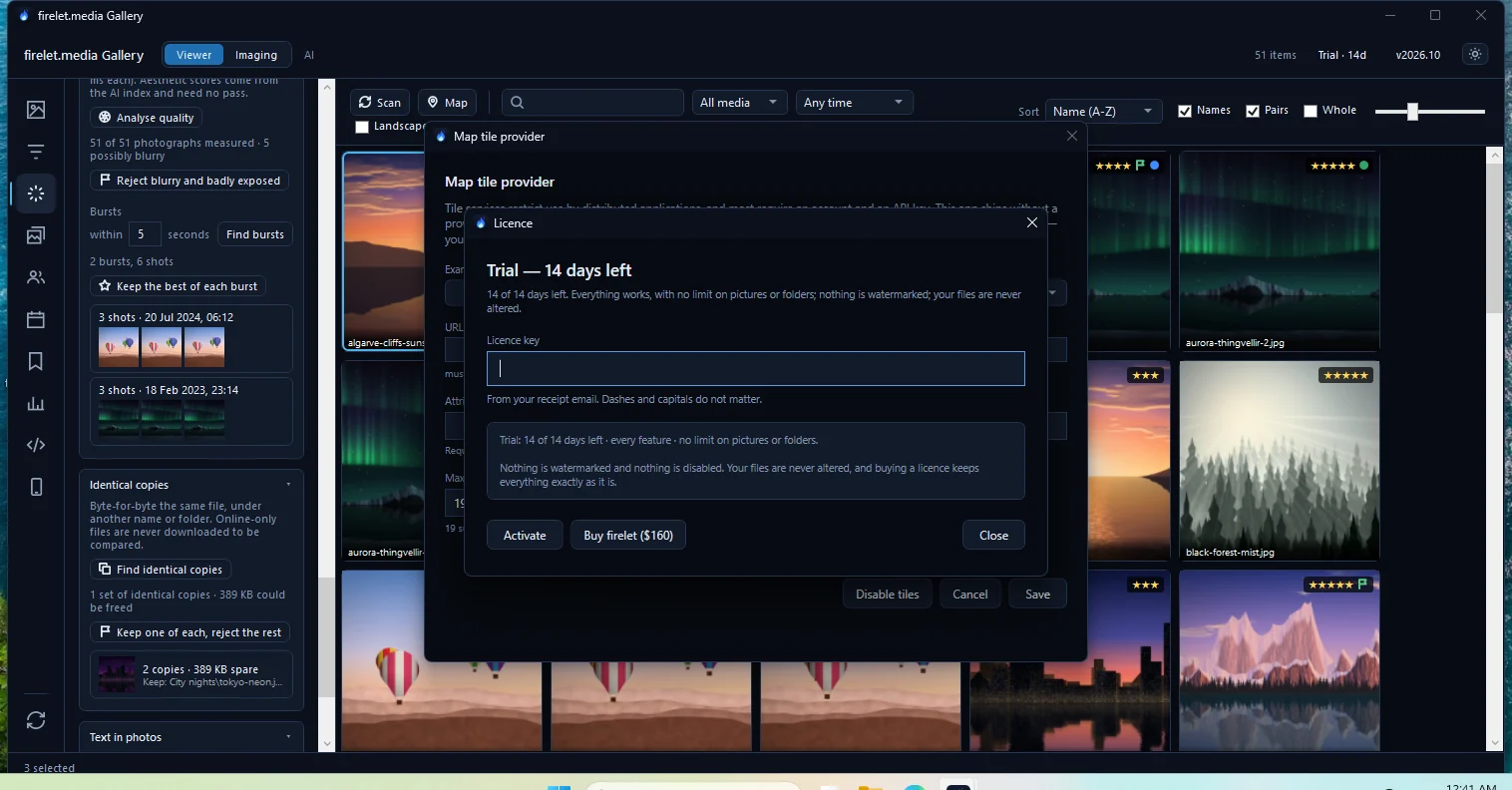
- Click the licence label at the top right of the title bar. During the trial it reads Trial · 14d or similar.
- Paste your key into the Licence key box. Dashes and capitals don't matter.
- Press Activate.
The gallery answers "Activated. Everything is unlocked — your library is untouched and needs no rescan." There is a fuller walk-through in how to activate your licence key.
Updates by the year: optional, same price any time
Updates are sold by the year: $100 buys 12 months of new releases for one computer. You can add them at the checkout, or later from your account's Licences page. The app also offers Extend updates ($100) when a new version comes out that your key doesn't cover.
The rules are simple, and they favour you:
- Everything published inside a year you bought is yours for good. When the year ends, you keep every release you got.
- Extending early adds to the time you have left. Nothing is lost by renewing before the end.
- A lapsed year restarts from the day you pay. There is no back-pay and no penalty for skipping a year or two.
- The price is the same whenever you buy. There is no higher rate for coming back after a gap.
The app checks for new versions when it starts and once a day. When one is out, a strip under the title bar says so. There is no automatic install: you download the new installer and run it over the old one, and your library and licence are kept. If you would like a reminder, your account has a switch to email you when a new version is out, and a month before your updates end.
The details, including what the title bar shows in each case, are in updates and "Past updates" explained.
Several computers on one key
If you want the gallery on a desktop and a laptop, you don't need two accounts or two keys. At the checkout, choose how many computers the key should cover. Each computer is $160, and a year of updates is $100 per computer.
Each activation takes one seat, and your account shows which computers hold them. The Devices page lists them by name, lets you rename them, and has a Release button to free a seat.
Moving a seat to a new PC works like this:
- Free the seat: press Release beside the old computer in your account, or press Deactivate this PC in the old computer's licence window.
- Activate the new computer with the same key.
A released computer keeps working until its current licence period runs out, which can be up to ninety days, so there is no rush. See how to buy for several computers and how to move your licence to a new computer for the step-by-step versions.
People sometimes call this a lifetime licence. That is right in the plain sense: the program never expires. The part you buy by the year is new releases, and only if you want them.
The key is for the product rather than for one operating system. When the macOS and Linux builds are available, a seat on your key will work there too.
What happens if you never renew
Nothing is taken away. This is the point of paying once.
- The build you own keeps working, with or without internet beyond the monthly check-ins.
- Older builds always activate. If you reinstall Windows or move to a new PC, download your build again from your account and activate it.
- Your library, ratings, albums, keywords, people and edits stay exactly as they are.
The one thing to know is what happens if you install a build released after your updates year ended. The title bar then shows Past updates. That copy still opens, browses, searches and edits everything, but it adds at most 50 new pictures until you either go back to the build your key covers (Get your covered build) or buy another year (Extend updates ($100)). In the app's own words: "You own this program and that has not changed."
Try first, refund if it isn't for you
The free trial is 14 days with every feature on and no limits: no cap on pictures or folders, no watermark, nothing disabled. It needs no card, no account and no email address, and it starts the first time you open the gallery on that computer. You can download the trial now, and read more in the 14-day free trial, with no limits.
If the trial ends before you buy, nothing is deleted. Everything already in the library stays browsable and searchable; the gallery simply stops adding new pictures. Enter a key and it carries on exactly where it stopped, with no rescan.
If you buy and change your mind, you get a full refund within 14 days of buying, for any reason or none:
- Sign in to your account and open Orders.
- Press Refund beside the order.
- Add a reason if you like (it's optional), then press Refund $X.
The button refunds the whole order, including any updates bought with it. Each account can use it once; after that, write to [email protected]. Paddle reviews refunds, usually within a day, and your bank then takes a few working days, occasionally up to ten. The licence ends once Paddle approves, and the gallery goes back to its trial state at its next check. Nothing on your computer is deleted.
See how to request a refund and the full refund policy. The current price is always on the pricing page.
Questions people ask
Does it stop working if I don't renew?
No. There is nothing to renew for the program itself: the build you bought, and every earlier one, keeps working for good, on this computer or a new one. Buying a year of updates is optional.
Is there a discount for several computers?
No. There are no tiers and no volume pricing: one key covers as many computers as you choose at the checkout, at the same $160 each.
Was this post helpful?
Thank you — that is counted, and nothing else about you is. Still stuck? Ask a person.